
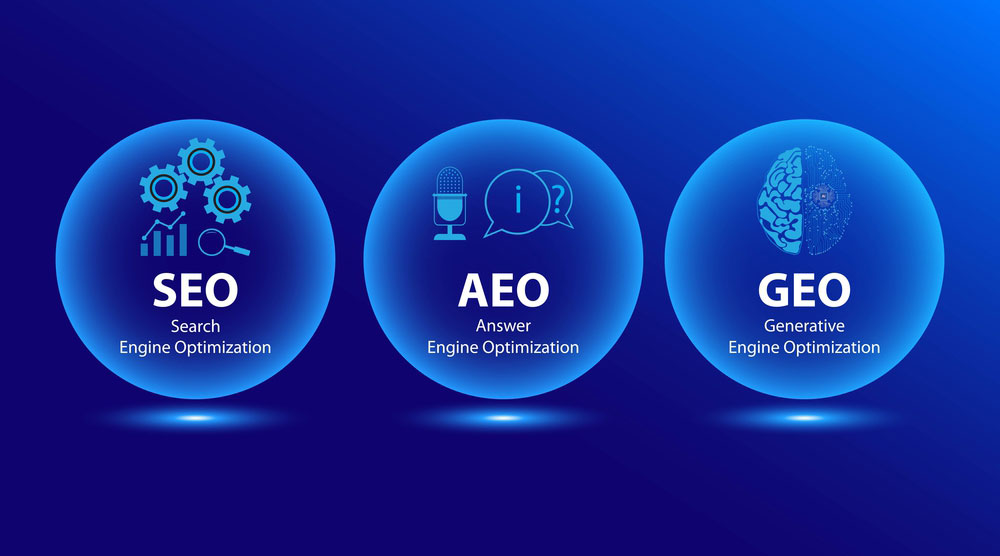
SEO. AEO. GEO. If it feels like every new acronym adds another item to your clinic’s marketing to-do list, you might be wondering where to start.
Say you run a chiropractic clinic that works with runners. One prospective patient searches Google Maps for a sports chiropractor nearby. Another wants to know how long a first visit takes. A third asks ChatGPT which chiropractors in their area work with runners.
So, do you need a separate strategy for Google Search, Google Maps, Google’s AI Overviews, and ChatGPT?
For most clinics, one strategy with a few adjustments is enough. Start with accurate business information, specific service pages, and clear answers to the questions patients ask before they book. Then put that information where people are most likely to look for it.
Listen to The Clinic Marketing Podcast
This episode breaks down SEO, AEO, and GEO using one chiropractic clinic and one service page. Listen for a practical way to decide what to update first, even if you only have 20 minutes
Before we get started, grab our free ChatGPT Business Visibility Toolkit for Clinics.
This practical workbook includes a business listing checklist, clinic profile worksheet, ready-to-use ChatGPT prompts, an AI visibility test, a scorecard, and a 30-day action plan.
It's designed to help you go beyond simply claiming your listing and start identifying opportunities to improve how your clinic is represented in AI searches.
>> DOWNLOAD YOUR FREE CHATGPT VISIBILITY TOOLKIT
Now, let's dive in...
What’s the difference between SEO, AEO, and GEO?
SEO helps people find your clinic
SEO stands for search engine optimization. For a chiropractic clinic, local SEO can help prospective patients find your website in Google Search or discover your Google Business Profile in Google Maps.
Say someone searches for “sports chiropractor near me.” They might compare clinics on the map, read a few reviews, and visit a website to see whether the clinic offers the care they’re looking for.
If your website only mentions sports chiropractic in a list of services, the patient may still have to call to find out whether you work with runners, which chiropractor they’ll see, and where to book. A dedicated sports chiropractic page gives you room to explain those details. Learn more about local SEO for clinics.
AEO helps people get a clear answer
AEO stands for answer engine optimization. It focuses on making answers to specific questions easy to find and understand. Those answers can help people reading your website and may also appear directly in search results.
Start with a question your front desk hears regularly. How long does the first visit take? What should patients wear or bring? Can they book online?
Here’s how a chiropractic clinic might answer one of those questions on its sports chiropractic page, using details that reflect how appointments work at that clinic.
How long is my first sports chiropractic appointment?
Plan for about 45 minutes. Your chiropractor will ask about your training and what brought you in. After the evaluation, they’ll talk you through what they found and discuss next steps.
The first sentence gives the patient the answer they came for. The rest helps them know what to expect. You can use this approach on service pages, new patient pages, and insurance or payment pages. Put each answer where someone is most likely to look for it.
GEO focuses on how your clinic might appear in AI-generated answers
GEO stands for generative engine optimization. It’s about how your clinic or its content might be mentioned or cited when an AI tool generates a response.
Someone might ask ChatGPT, “What should I look for in a sports chiropractor who works with runners, and are there any near Boca Raton?”
That person wants help understanding what to look for and examples of clinics that fit. If working with runners is part of your practice, say so on your website. Name the chiropractor who provides the service, describe their experience with runners, and specify which location offers it. Those details help prospective patients evaluate your clinic and give AI search tools specific information they may be able to reference. Explore AI search optimization for clinics.
One sports chiropractic page can support all three. It describes a service someone is searching for, answers a question they have before booking, and provides information an AI tool may be able to use.
Where should your clinic focus on Google, AI Overviews, and ChatGPT?
Google Search and Google Maps
Start with your Google Business Profile and the website page it sends people to. Check your address, phone number, hours, business categories, and appointment link. Then open that page on your phone. Can you tell what the clinic offers, where it’s located, and how to schedule?
If you have multiple locations, follow each booking link yourself. Someone who found your clinic through the profile for one office should be able to confirm which location they’re booking before they submit an appointment request.
Google’s AI Overviews
Start with the service and new patient pages you already have. Look for places where you can answer a real patient question more clearly.
For example, if the first-visit details are buried near the bottom of your sports chiropractic page, give them a descriptive heading. Put the answer first, then explain anything a prospective patient needs to know. Use details specific to your clinic, such as how long you ask patients to set aside or what you’d like them to bring. See what to fix on your clinic website before writing another blog post.
ChatGPT Search
Check how your clinic is represented on your website and in places where it’s already listed. If a professional directory shows your old address or a local running club links to a service page you’ve retired, request an update.
You can also check whether your clinic has a ChatGPT business listing you can claim. Our walkthrough explains the process and includes a free guide you can download and follow as you go. How to claim your clinic’s business listing on ChatGPT and download the free guide.
Your business listing and your website’s crawler settings are managed separately. If you want your website content to be eligible for ChatGPT Search summaries and snippets, you can do a quick check for a common crawler block.
How to check whether your website blocks ChatGPT’s search crawler
ChatGPT Search uses a crawler called OAI-SearchBot to discover web pages. Your website can give crawlers instructions through a public file called robots.txt.
1. Open your clinic’s robots.txt file
Go to your clinic’s main website address and add /robots.txt after the domain.
Examplehttps://yourclinic.com/robots.txt
Replace yourclinic.com with your actual domain. If your website normally loads with www, use that version. If you start on a service or location page, remove the page path before adding /robots.txt.
2. Search for OAI-SearchBot
Use Ctrl + F on Windows or Command + F on a Mac to search the file for OAI-SearchBot. A common sitewide block looks like this:
User-agent: OAI-SearchBot Disallow: /A forward slash on its own tells the crawler to stay out of the entire site unless a more specific rule allows a particular path. A rule like Disallow: /private/ applies to that path.
If you don’t see OAI-SearchBot listed by name, look for User-agent: *. The asterisk identifies a general group that can apply to crawlers without their own group. If you see Disallow: / there or find several rules that look like they could apply, ask your website team to confirm how those rules affect your public pages.
3. Give your website team the URL and the rule you found
If you spot a possible block, send the URL of your robots.txt file and copy the rule you found. Here’s a question you can use:
Could you confirm whether OAI-SearchBot can access our public service and location pages? I found a
Disallowrule in ourrobots.txtfile and would like to know whether it applies to those pages.
This check helps you spot a common issue in one public file. Crawler access makes it possible for your content to be considered. Whether ChatGPT mentions your clinic or cites a page can vary with the question and the sources it uses.
A 20-minute update you can make to one service page
Pick a service you want more patients to know about and open that page on your phone.
For our example, that’s the sports chiropractic page.
- Read the opening as a prospective patient. Can you tell what the service is, who it’s for, and where it’s offered? If your clinic works with runners and that’s an important part of the service, say so early. If the service is available at only one location, name that location.
- Answer one question people ask before booking. Ask your front desk what they explain repeatedly. If people often ask what happens at a first visit, add a short answer that reflects what patients can expect at your clinic.
- Show who provides the care. Name the chiropractor and link to their bio so patients can learn about their experience.
- Test the booking link. Tap it and make sure it takes you to the right location, provider, or appointment type. If you schedule by phone, check that tapping the number starts a call.
Updating one service page is one step in improving your clinic’s visibility. If you’d like help deciding what to tackle next on your website, in Google Maps, or in AI search, book a discovery call with Propel Marketing & Design. We’ll talk through your clinic’s goals and where you could use support.
Related Resources for Clinics
- Local SEO for Clinics
- AI Search Optimization and AEO for Clinics
- AI Search Strategy for Clinics: Questions to Ask Before You Invest
- How FAQs Can Help Your Clinic Show Up in Google and AI Search
- Make Google Match You with the Right Patients: The Website Pages Your Clinic Needs
- Clinic SEO: What to Fix Before Writing Another Blog Post
- Chiropractor SEO and AI Search: What Your Website May Be Missing
- Chiropractic SEO Keywords: A Step-by-Step Guide for Clinics
- Your Chiropractor Website Checklist
- Ready. Set. Rank! Clinic SEO Toolkit
Listen on...


Get our next podcast episode delivered directly to your inbox:
We'll email you when we release new episodes.